AI voiceover that doesn't sound like filler
A produced voiceover differs from filler in casting, direction, pronunciation, editing, and the mix. Each of those is human work.
By NoFaceTube Editorial Published Updated 11 min read Not yet reviewed by the editor
On this page
Flat narration loses viewers. Many synthetic voices now sound natural line by line, but the defaults around them have not changed: the same voice, the same cadence, the same mispronounced place names, under the same music bed. Directing a voice well is a craft goal. It is never a reason to skip a label a platform requires; see AI disclosure rules.
This guide covers the craft of a synthetic voiceover from script to export: casting, direction, pronunciation, breaths and pauses, editing takes, and the mix. It ends with the rules on licensing, consent, likeness, and disclosure. We have not run controlled tests of voice tools and do not rank or recommend any. Features differ by tool and by plan, so where we describe a technique, check whether your tool supports it.
Common AI voiceover mistakes
These are the slop tells of synthetic voiceover. Most come from the workflow, not the voice.
- One cadence for every sentence: the same rise, the same fall, the same pause length, line after line.
- Uniform sentence rhythm: every sentence about the same length and built the same way, so the read has no shape.
- Wrong stress on names: places, people, and borrowed words pronounced the way they are spelled, or stressed on the wrong syllable.
- Skipped, added, or swapped words: the voice drops a clause, repeats a phrase, or says a different word than the script. After a few listens you hear the script you wrote, not the take, so these slip through.
- Numbers read wrongly: years read as quantities, “Louis XIV” read as letters, “St.” read as “street” in a saint’s name.
- Emphasis on the wrong word, or on every word.
- Pauses at line breaks, not at meaning: the voice stops where the script wrapped, not where the thought ended.
- Breaths in mechanical places, or no breath at all for three minutes.
- Over-processed sound: squashed dynamics, sharp “s” sounds, a brittle top end.
- A default voice that viewers have heard on many other channels.
- A rushed read, sped up to hit a target length.
- Narration fighting the music, so words are lost on a phone speaker.
The Standard’s directed voice criterion is the opposite of this list: a voice cast for the material and directed line by line.
Fix the script first
A synthetic voice reads punctuation and word order. It cannot read intent. Write for the ear:
- Vary sentence length. Short sentences hit. Longer ones carry explanation that needs to flow, as long as the listener can follow them in one pass.
- Put the important word last. Build sentences so the word that matters lands at the end, where listeners expect the news.
- Write numbers the way they should be said. “Nineteen fourteen”, “four point two million dollars”, “the fourteenth century”.
- Cut parentheses and nested clauses. A listener cannot scroll back.
- Read it aloud once yourself. Wherever you stumble, the voice will too.
Good scripts also give the voice room. A line that needs a pause should be its own sentence, or its own paragraph.
Cast the voice for the niche
Casting matters more than any setting. A voice that suits the material needs less correction later. These pairings are our editorial starting points:
| Niche | Look for | Avoid |
|---|---|---|
| History | Measured, warm, mid to low register, unhurried | Movie-trailer drama |
| Science and space | Clear, curious, precise consonants | Breathy or sleepy delivery |
| Unsolved mysteries | Low, restrained, serious | Horror theatrics and whispering |
| Psychology | Warm, conversational, calm | Lecturing or salesy tones |
| Personal finance | Plain, steady, neutral | Hype and the “guru” register |
| Nature and animals | Calm, unhurried, soft attack | Constant excitement |
| Technology | Crisp, quick, friendly | Precision with no warmth |
| Mythology | Storyteller warmth, wide dynamic range | A single flat register |
Run a casting test. Render the same three lines with every candidate voice: one heavy with names, one heavy with numbers, one emotional beat. Listen on a phone speaker and on headphones. Choose the voice that gets closest on all three before you adjust anything.
Keep one narrator per channel. A consistent voice is part of a channel’s identity. Avoid the voice you already hear on many channels in your niche, because it signals a default.
Present the narrator as the channel, not as an expert. On health, finance, legal, or political topics, do not dress a synthetic voice up as a doctor, adviser, lawyer, or political analyst. Under YouTube’s July 2026 clarification, AI-generated personas presented as human experts giving advice on health, finance, legal issues, or politics can cost a channel its Partner Program eligibility (Tubefilter).
Direct the performance
Depending on the tool, direction happens through voice settings, written instructions, punctuation, markup, or regenerating until a take matches what you want. The principles are the same.
Mark the intent of each section
Before rendering, label each paragraph with what it has to do: inform, warn, reveal, reflect, conclude. A reveal needs a different read from the context that precedes it. If you cannot name the intent, the paragraph may not need to be there.
Choose one stressed word per sentence
Stress changes meaning. “She didn’t sign the treaty” implies she signed something else. “She didn’t sign the treaty” implies someone else did. Decide which word carries the meaning in every sentence that matters. If the voice stresses the wrong one, rewrite so the target word falls at the end, or split the sentence. Do not mark emphasis on several words in a row; the result sounds like shouting.
Vary the pace with the material
Move faster through context and lists. Slow down into the key fact. Leave space before and after a reveal. A mystery read can build slowly and reveal quickly; a documentary read stays even and measured, with room after each key line. A read that is slow all the way through is as flat as one that is fast all the way through.
Average speech for US English speakers runs at about 150 words per minute (NCVS), and audiobooks are typically recorded at about 150 to 160 (Psychology Today). A good read moves above and below that within a single video. Plan runtime with how long a Short should be, and cut lines rather than speeding up the voice.
Render in sections, not in one block
Generate scene by scene or paragraph by paragraph. You can then direct each section on its own and regenerate one line without touching the rest. Keep the voice settings the same across sections so the narrator does not drift, and listen to every section boundary in sequence.
Control pronunciation
Keep a pronunciation list for the channel
List every proper noun, place, technical term, and borrowed word the channel uses, how it should be said, and where you confirmed it: a recording of a native speaker, the person themselves in an interview, an official source. Reuse the list on every video. It is the cheapest quality upgrade available, and it prevents the same mistake from appearing across a back catalogue.
Use the controls your engine offers
- Pronunciation dictionaries: some tools let you map a word to a respelling or a phonetic transcription once, then apply it every time the word appears.
- Phonetic transcription: where supported, write the pronunciation in a phonetic alphabet such as IPA rather than guessing at spelling.
- SSML: some engines accept Speech Synthesis Markup Language, a W3C standard markup with tags for pauses, emphasis, speaking rate and pitch, phonetic pronunciation, and how to read numbers and dates. Support varies widely, and many tools accept only part of it. Check your tool’s documentation.
- Respelling as a last resort: writing “Wuss-ter” for “Worcester” works, but keep respellings out of your caption file. Captions generated from a respelled script will show the respelling.
Check numbers, dates, and abbreviations
Listen specifically for years, currencies, ordinals, units, and Roman numerals. “Louis XIV” should be “Louis the Fourteenth”. “St. Petersburg” should not be “Street Petersburg”. “1500 BCE” should be read as a year, not as “one thousand five hundred”. When in doubt, write the spoken form into the script.
Breaths and pauses
- Pauses carry meaning. Short at commas, longer between sentences, longest between sections and after a reveal. A single pause length everywhere is a slop tell.
- Place pauses by meaning in the edit. Do not rely on where the script happened to break.
- Keep natural breaths, cut mechanical ones. If your voice generates breaths, keep those that sit where a narrator would breathe, such as before a long sentence. Cut breaths in the middle of a phrase. Do not add a breath before every sentence; a regular pattern is as artificial as none.
- Turn breaths down rather than deleting them when removal leaves an unnatural gap.
- Use silence. Let a visual or a sound effect take a beat with no narration at all.
Edit takes like a dialogue editor
- Generate several takes of difficult lines and assemble the best phrases from each.
- Cut at natural boundaries: inside a pause, at a breath, or just before a hard consonant such as “p”, “t”, or “k”, where edits are easiest to hide.
- Add a short crossfade at every edit to avoid clicks.
- Match energy across takes. A line rendered on its own can come out brighter or flatter than its neighbors. Listen to every edit in context.
- Time the voice to picture. Nudge lines so they land with the cut, or let an image settle before the next line starts. Avoid heavy time-stretching, which adds audible artifacts.
- Listen once without picture. The narration should hold up as audio alone.
Mix the voice so it sits in the video
Clean and shape the voice
- A high-pass filter removes low rumble below the voice.
- Gentle EQ tames harshness, and a de-esser softens sharp “s” sounds.
- Light compression evens out level. Heavy compression is a slop tell: no dynamics, breaths as loud as words, and a sound that tires the ear.
Put the voice above the music
Narration comes first. The music sits underneath and drops further while the voice is speaking, through sidechain ducking or manual automation, then rises in the gaps. Under narration, choose music without vocals or a busy midrange, because that is where speech lives.
Then run the phone test. Play the mix on a phone speaker at low volume. Every word should be clear without effort. If you strain to hear a word, the music is too loud or too busy. The Standard’s sound design criterion asks for more than a voice and one music bed; effects and ambience need the same check.
Loudness on YouTube
YouTube normalizes playback loudness. Independent measurements by the mastering site Production Advice show that it turns down videos louder than its reference level and does not turn quieter ones up. You can see the adjustment on any video: open “Stats for nerds” and read the “Volume / Normalized” line. A positive “content loudness” value means the video is louder than YouTube’s reference by that many decibels, and YouTube turns it down to compensate (Production Advice).
YouTube does not document the reference level in its help pages, so we do not give a target number. In practice:
- Mix for clarity and consistency across videos, not for maximum loudness. Extra loudness is turned down anyway, and the compression used to get there stays.
- Avoid clipping on export.
- After upload, check Stats for nerds. A large positive value suggests the mix is squashed for no gain. A large negative value means the video sits below YouTube’s reference level, and YouTube will not turn it up.
Licensing, consent, and disclosure
Read the terms of your plan
Voice tools set commercial rights by plan, and the terms change. Before you publish, confirm for the exact plan you pay for:
- whether commercial use and monetized publishing are allowed, and on which platforms;
- whether attribution is required;
- what happens to your rights in audio you already generated if you cancel or downgrade;
- whether voices from a shared library carry extra terms set by the person who created them.
Save a dated copy of the terms, and note which plan you were on when you generated each file.
Clone only with consent
Clone your own voice, or a voice whose owner has given explicit written permission that covers your use. Never publish a sound-alike of a celebrity, narrator, or creator. YouTube’s examples of content that needs disclosure include cloning someone else’s voice for voiceovers or dubs (YouTube Help), and people can ask YouTube to remove AI content that realistically simulates their face or voice (YouTube Help).
Likeness detection will add voices
YouTube’s likeness detection lets enrolled people find AI-generated videos that use their face and request removal. At Made On YouTube on September 23, 2026, YouTube announced that it will add speaking voice detection later in 2026 (YouTube, MediaNama). As of early October 2026, YouTube’s help page describes face matching only. Once voice matching ships, a cloned voice of an enrolled creator may become findable. The tracker entry on likeness detection follows the rollout.
Disclose where the platform requires it
- YouTube asks for disclosure of realistic altered or synthetic content. Its 2024 announcement listed “synthetically generating a person’s voice to narrate a video” (YouTube Blog), and its help page lists cloning someone else’s voice for voiceovers (YouTube Help).
- TikTok requires a label on AI-generated content with realistic images, audio, or video (TikTok Support).
- Meta requires disclosure of realistic-sounding audio that was digitally created or altered (Meta).
A stock synthetic narrator reading your own script is a gray area on YouTube and, read literally, covered on TikTok and Meta. When unsure, disclose. Our AI disclosure rules guide works through each case. A voice directed well enough that it sounds produced is a craft goal. It is never a reason to skip a label a platform requires.
A pre-export checklist
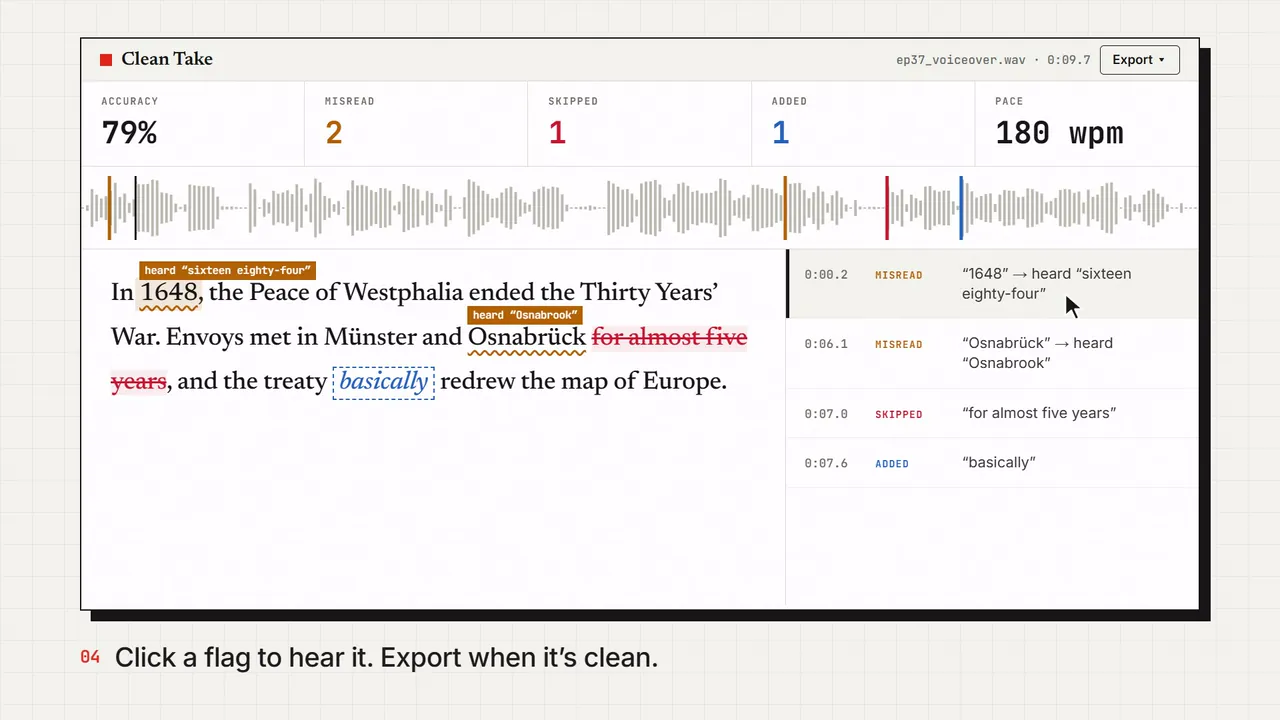
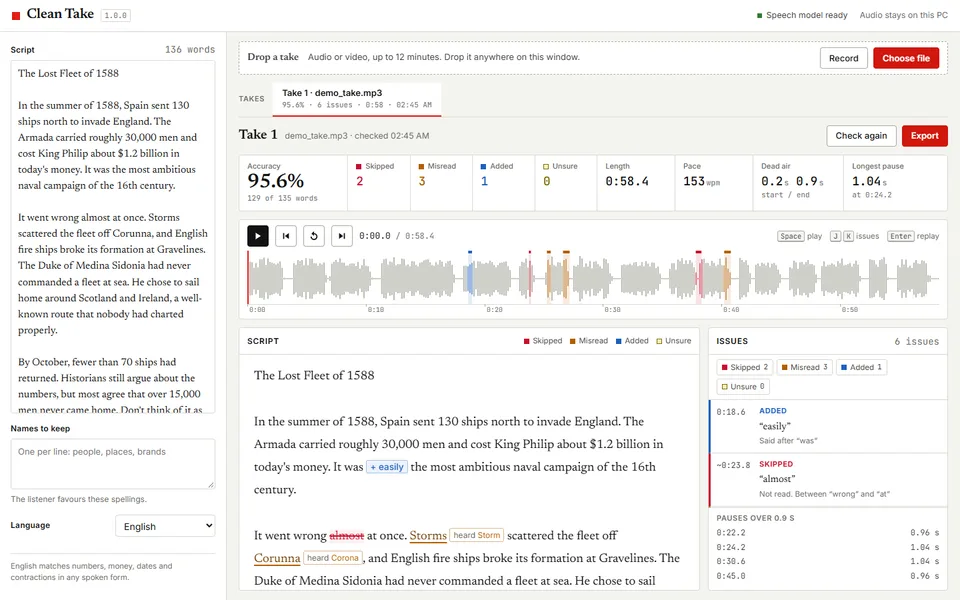
- The take says every word of the script and nothing else. Check it against the script, not from memory. Clean Take, our own voiceover checker, does this word by word.
- Every proper noun matches the channel’s pronunciation list.
- Numbers, dates, and abbreviations are read the way a person would say them.
- Each sentence has one stressed word, and it is the right one.
- Pace changes with the material, and nothing is sped up to fit a length.
- Pauses sit at meaning. Breaths are natural or absent, never regular.
- No clicks, audible edits, or jumps in energy between takes.
- Every word is clear on a phone speaker at low volume.
- The plan’s terms allow this use, and consent is on file for any cloned voice.
- Disclosure is set wherever the platform requires it.
- After upload, Stats for nerds shows no large loudness adjustment.
What to do next
- Score the narration against the Standard’s directed voice and disclosure and compliance criteria.
- Match the voice to the format with faceless video styles that hold up.
- Set a word budget with the Short length calculator.
- Check labels in AI disclosure rules.
Sources
- 1Disclosing use of GenAI contentYouTube Help
- 2How we’re helping creators disclose altered or synthetic contentYouTube Official Blog · 2024-03-18
- 3Protecting your identityYouTube Help
- 4Likeness detection on YouTubeYouTube Help
- 5Made On YouTube 2026: All Announcements & New FeaturesYouTube Official Blog · 2026-09-23
- 6YouTube expands likeness detection to voicesMediaNama · 2026-09
- 7AI-generated contentTikTok Support
- 8Labeling AI-generated images on Facebook, Instagram and ThreadsMeta · 2024-02-06
- 9YouTube clarifies that creators can’t monetize “generic or repetitive content,” content that’s “unsatisfying or off-putting,” or content with fake AI “experts”Tubefilter · 2026-07-13
- 10YouTube Stats For Nerds: exact volume normalization values revealed, and how to find themProduction Advice
- 11Voice qualitiesNational Center for Voice and Speech
- 12Is Speed Listening Right for You?Psychology Today · 2023-07
- 13Speech Synthesis Markup Language (SSML) Version 1.1W3C · 2010-09-07
Spotted an error or a dead source link? Send a correction.