Clean Take · Voiceover checker for Windows
Catch every flubbed line before you publish.
Drop in your voiceover and paste the script. Clean Take listens on your PC and marks every word that was skipped, added, or misread, with a timestamp you can click to hear. Then it exports captions in your exact spelling.
Windows 10 and 11 · Works offline · No subscription
- One program, speech model built in
- 31 MB
- Longest take per check
- 12 min
- Languages
- 7
- Your audio stays on your PC
- Offline
Why it exists
By the fifth listen, you hear the script, not the take.
AI voices drop words, read “1,500” as “one five zero zero”, and invent a new way to say a name in every take. Human reads lose a line on the third retake. You know the script by heart, so your brain fills the gap and you never notice.
Your viewers notice. A skipped clause breaks the argument, a mangled name reads as careless, and wrong captions get screenshotted. Clean Take compares what was said against what was written, word by word, so you fix it before it ships, not after.
How it works
Three steps, all on your PC- 01
Paste the script
The text exactly as it should be read. Add names and terms on their own lines so the recognizer listens for them.
- 02
Drop the take
Any audio or video file, or record right in the app. It transcribes on your CPU and lines every word up with the script.
- 03
Fix what’s flagged
Click each issue to hear it. Auto-cut drops the retakes and dead air, and you save the cleaned audio with captions and markers to match.
What it catches
Punctuation and capitals are ignored- Skipped
- A script line or word the take never said.
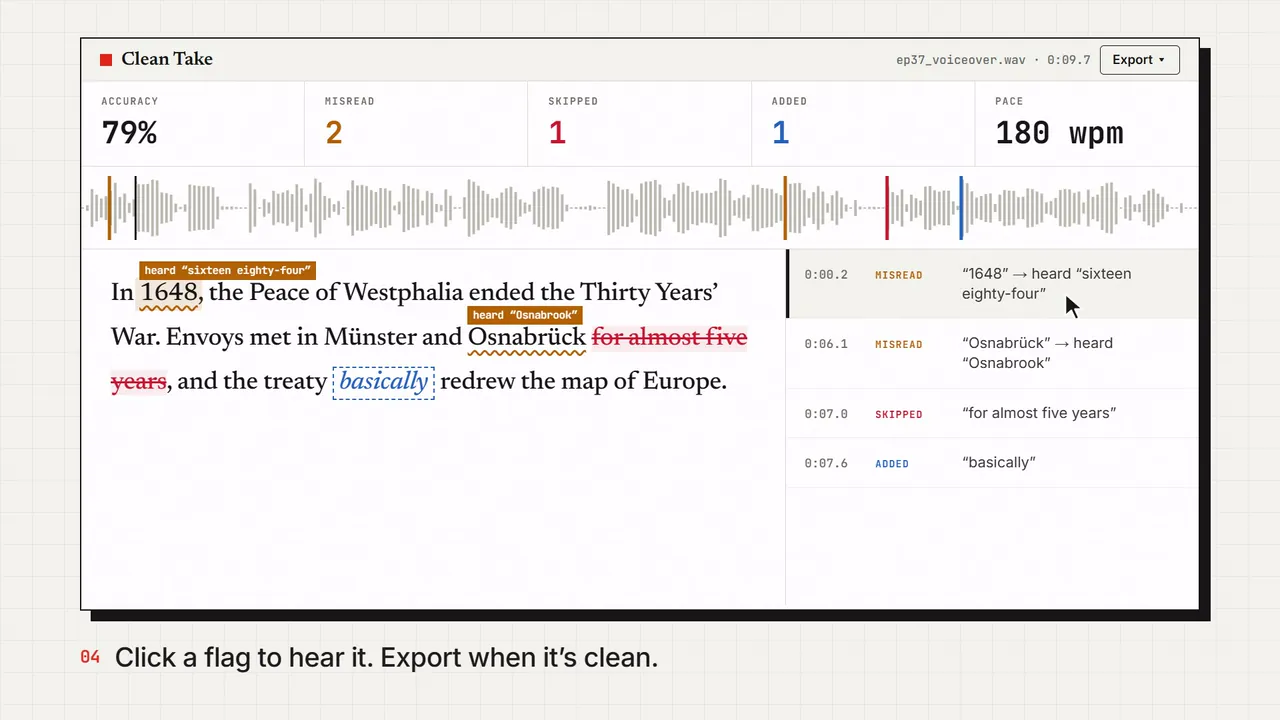
- Script: “for almost five years”. Take: nothing.
- Misread
- The take said a different word than the script.
- Script: “Osnabrück”. Take: “Osnabrook”.
- Added
- Words in the take that are not in the script.
- Take: “and the treaty basically redrew…”
- Unsure
- The words are there but sound mumbled or clipped. Worth a listen.
- A swallowed word at the end of a breath.
- Accuracy
- 83%
- Skipped
- 4
- Misread
- 1
- Added
- 1
In 1648 the Peace of Westphalia ended the Thirty Years’ War. Envoys met in Münster and Osnabrück, heard Osnabrook (skipped: for almost five years), and the treaty (added: basically) redrew the map of Europe.
- 0:07.2 Misread “Osnabrück” → heard “Osnabrook”
- 0:09.8 Skipped “for almost five years”
- 0:13.9 Added “basically”
The actual app
A real check of a real take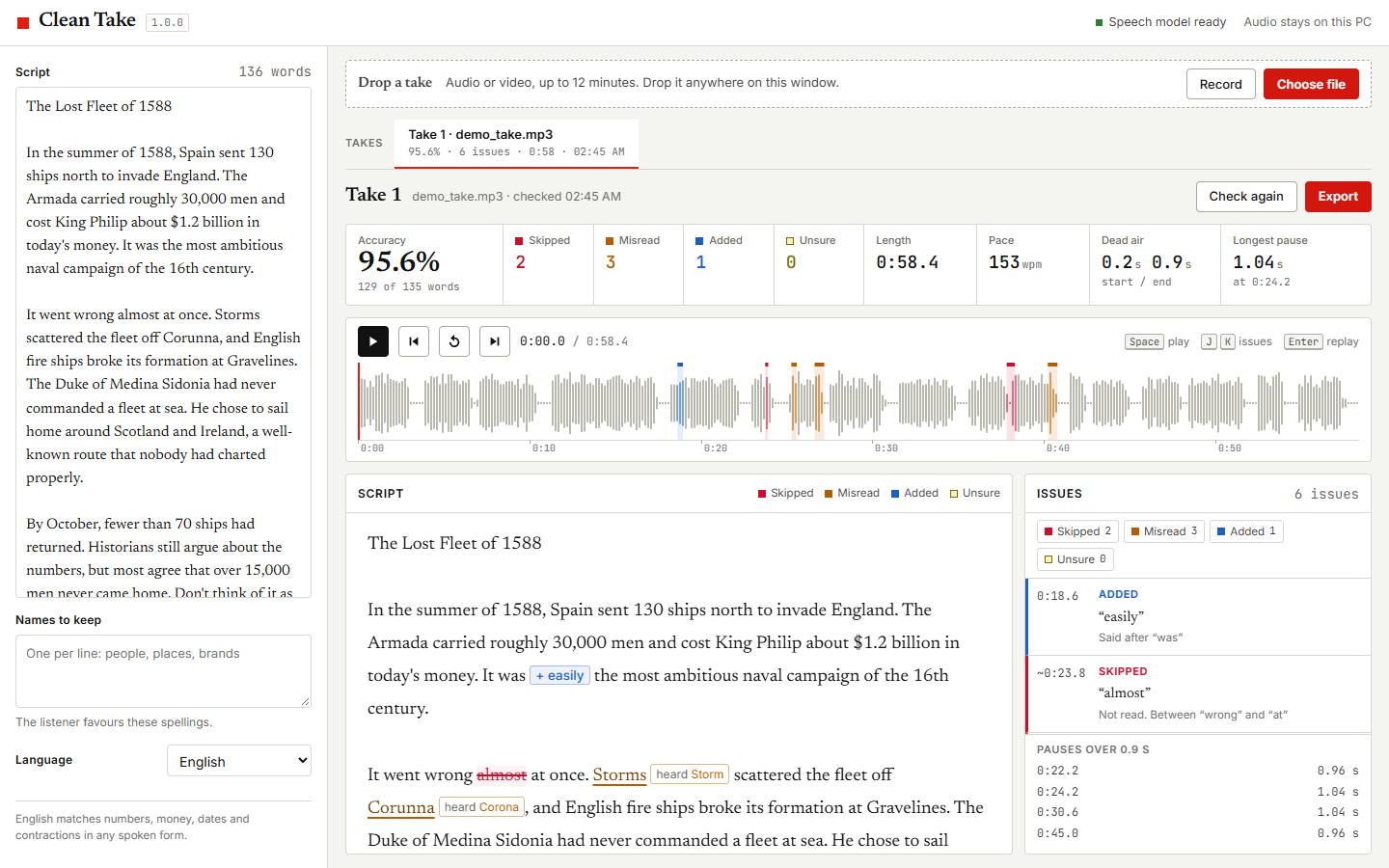
Everything you get
One price, every feature-
Auto-cut retakes and dead air
When you flub a line and read it again, Clean Take cuts the failed attempt and keeps your last clean read. Long pauses shrink to the length you set. Save the cleaned WAV, captions timed to it, and an EDL to apply the same cuts to your video.
-
Any audio or video file
WAV, MP3, M4A, FLAC, OGG, or the audio track of an MP4. Drag it onto the window, or record straight into the app.
-
Reads numbers the way people say them
“1500” matches “fifteen hundred”, “1648” matches “sixteen forty-eight”, and “$5” matches “five dollars”. Contractions and hyphens count too.
-
Click a problem, hear it
Every issue is pinned to the waveform. Click one and it plays that spot with a short lead-in. J and K, or the arrow keys, jump between issues.
-
Captions in your spelling
Export SRT or VTT timed to the take, using the script’s spelling and punctuation, so names come out right. One preset for long-form, one for Shorts.
-
Markers for your editor
Export the issues as markers for DaVinci Resolve and Premiere, an Audacity label track, or a plain fix list for whoever records the pickup.
-
Pace
Words per minute, the longest pauses, and the silence at the head and tail of the take.
-
Compare retakes
Every check gets its own tab with its scores, so you can check take two against the same script and keep the cleanest one.
-
Private by design
Speech recognition runs on your own CPU. The audio and the script never leave your PC, and there is no account.
Straight answers
What it does not do
- It does not generate a voice or re-record a line. It can cut out a failed attempt you read again, but a word you misread and never corrected still needs a pickup.
- It cannot judge delivery. A flat read with every word right still scores 100%. For direction, see the guide on making an AI voiceover sound natural and the Standard’s directed voice criterion.
- It does not label AI content for you. What YouTube, TikTok, and Meta require is in the AI disclosure rules guide.
- It says nothing about whether a platform will monetize the video. The Standard covers that.
- Windows 10 or 11 only. Takes up to 12 minutes. One check runs at a time.
Questions
Before you buy
- 01
Does it work with AI voices like ElevenLabs?
Yes. Export the generated voiceover as any common audio file and drop it in. AI voices are where it earns its keep: they skip words, swap numbers, and mangle names without warning.
- 02
Do I need a GPU or an internet connection?
No GPU. It runs on the CPU of a normal Windows PC. Clean Take is a single 31 MB program with the speech model built in, so it works offline from the first run. Double-click it. Nothing to install.
- 03
How long can a take be?
Up to 12 minutes per take. For a longer video, check it in sections: one take per chapter is the usual way to record anyway.
- 04
Which languages does it support?
English, German, French, Spanish, Italian, Dutch, and Polish. Number and contraction matching is English only for now. The other languages match word by word.
- 05
Is there a Mac version?
Not yet. Clean Take is Windows 10 and 11 only.
- 06
What does it cost?
$9 when you join our free email list, or $15 without joining. Either way you pay once, there is no subscription, and you keep the version you bought. The list sends about one email a week, and you can unsubscribe from any of them.
- 07
How does the $9 price work?
Enter your email on the checkout page and confirm it. The link in that email opens the checkout with a one-time code already applied, so you pay $9.
- 08
How do I get it after I pay?
You pay on this site, and Whop processes the card. As soon as the payment clears, the next page gives you the download, straight from NoFaceTube. Bookmark that page to download again later. Sales tax is added at checkout where it applies.
- 09
What if it doesn't work for my audio?
Email hello@nofacetube.com within 14 days of buying and you get the full price back. No reason needed.
Clean Take
Ship the take you meant to record.
Windows 10 and 11 · Works offline · No subscription