Tool
Short length calculator
Paste a script to estimate its runtime, or set a target length to get a word budget, and see which YouTube Shorts, TikTok, and Reels thresholds it crosses.
Not yet reviewed by the editor
Estimate a length
Start from a script to see how long it will run, or from a target length to see how many words fit. Nothing you paste leaves your browser.
Words per duration at three paces
How many spoken words fit in common Short lengths, at the typical value of each pace preset. Use it to plan a script before you write, or to check a draft without the calculator.
| Runtime | Measured (130 wpm) | Conversational (150 wpm) | Brisk (170 wpm) |
|---|---|---|---|
| 15 seconds | 32 | 37 | 42 |
| 30 seconds | 65 | 75 | 85 |
| 45 seconds | 97 | 112 | 127 |
| 60 seconds | 130 | 150 | 170 |
| 90 seconds | 195 | 225 | 255 |
| 2 minutes | 260 | 300 | 340 |
| 3 minutes | 390 | 450 | 510 |
Figures are runtime multiplied by pace, rounded down. They assume narration from the first frame to the last, which a good edit rarely has. At 150 words per minute, keeping 10 to 20 percent of a 60-second Short free of narration leaves about 120 to 135 words, not 150.
How the calculator works
In script mode it counts the words the voice will say, adds the pauses you marked, and divides by a pace. In target mode it runs the same arithmetic backwards: runtime, minus the time you keep for beats, multiplied by the pace.
Pace is the assumption
Everything rests on speaking rate. The National Center for Voice and Speech puts the average rate for US English speakers at about 150 words per minute (NCVS). The conversational preset is centered on that figure (140 to 160 wpm). The measured (120 to 140) and brisk (160 to 180) presets are our assumptions, chosen to bracket an unhurried documentary read and a fast-facts read. They are not measured standards.
Each preset is a range, so the result is a range: the fastest read in the preset to the slowest. A custom pace is one number, so it gives one figure. Real narration does not hold a single pace. Readers slow down for a reveal and speed up through a list, and synthetic voices vary by model and settings. The most accurate pace is your own: time a read of a passage with a known word count, then enter the result as a custom value.
It counts what is spoken
- Numbers count as they are read aloud: 1,200 is four words (“one thousand two hundred”), $4.2M is five, and 50% is two. Four-digit numbers without a comma are read like years, so 1984 is three.
- Hyphenated compounds count by part, because each part is spoken: “well-known” is two words. Contractions count as one.
- Directions are skipped: anything in [square brackets], speaker labels such as NARRATOR: or VO: at the start of a line, and markup tags.
- Abbreviations are the known gap. The counter cannot tell whether a set of capitals is said as a word or letter by letter. Write out anything the voice will spell, then count again.
Pauses and beats
-
A
[pause],[beat], or[silence]marker adds 1 second unless you change the default.[pause 2s]or[pause 500ms]sets its own length. SSML-style<break time="1.5s"/>tags are read the same way. - Each blank line between paragraphs adds 0.5 seconds by default. Set it to 0 if your edit runs paragraphs together.
- In target mode, 10 percent of the runtime is kept free of narration by default, for reveals, sound effects, and on-screen text the viewer needs time to read.
These defaults are working assumptions, not platform data. Set them to match your own edit.
How thresholds are read
Each platform threshold below is a “longer than” rule. When the estimated range sits entirely on one side of a line, the result says which side. When the range crosses it, the result is marked borderline, because a slower or faster read could land on either side. A result within 5 seconds of a line is flagged as close.
Platform limits the calculator checks
Current as of 5 October 2026. Platforms change these rules, and the rules tracker records each change with its sources.
| Platform | Threshold | What changes | Source |
|---|---|---|---|
| YouTube Shorts | Longer than 3 minutes | Longer than three minutes is too long to be a Short. | YouTube Official Blog , YouTube Help |
| TikTok | Longer than 1 minute | Required for Creator Rewards. TikTok’s pages say “at least” and “over” one minute, so the calculator requires more than 60 seconds. | TikTok Newsroom , TikTok Support |
| Instagram Reels | Longer than 3 minutes | Longer than three minutes is not recommended to new audiences. | Social Media Today , Instagram Help Center |
YouTube Shorts
YouTube announced in October 2024 that from October 15, square and vertical videos of up to three minutes could be Shorts. Its help page on three-minute Shorts covers Content ID. Until September 24, 2026, YouTube blocked any Short longer than one minute that had an active Content ID claim. YouTube says new Shorts uploaded from that date are no longer blocked automatically and may stay playable, so the calculator does not flag one minute for YouTube.
A claim still means someone else owns the music or footage. For narrated faceless work built on licensed music and stock footage, confirm every track and clip is cleared for that channel before you publish a Short of any length, and keep the licenses where you can find them.
TikTok
TikTok’s launch post for the Creator Rewards Program says it pays for original videos over a minute long. Its support page says videos must be at least one minute long, and lists the follower, view, age, and country requirements an account must also meet. Because the two pages disagree, the calculator treats exactly 60 seconds as too short, so aim clearly past the line. The Creator Rewards tracker entry has the full requirements.
Instagram Reels
Instagram raised the Reels limit from 90 seconds to three minutes in January 2025 (Social Media Today). Its help center says reels longer than three minutes won’t be recommended to new audiences. For an account that grows through discovery, three minutes is the working ceiling.
How to use it in production
The calculator does arithmetic. The decisions around it are where quality comes from. A workable order:
- Pick the length from the story, not the limit. As editorial starting points, a single fact fits in 15 to 35 seconds, a setup with a turn and a payoff in 35 to 60, and a mini-narrative with stakes in 60 to 90. The guide to Short length covers story shapes and each platform’s thresholds in full.
- Get a word budget before you write. Use target mode, with the share kept for beats set to match your edit. Writing to a budget is easier than cutting a long draft later.
- Count after the fact-check. Corrections change the length. Check the script against the Standard’s researched script criterion first, then count the final text.
- Time a real read. Generate or record the narration and compare its length with the estimate. If they differ by more than a few seconds, measure your pace and switch to custom.
- Cut lines, not speed. If a script runs long, remove a line. Raising a synthetic voice’s speaking rate to squeeze under a threshold produces a rushed read that sounds like filler. The AI voiceover guide covers pacing and direction.
- Check the cut, not just the script. Final runtime comes from the edit. Review it against the Standard’s edit rhythm criterion before you export.
Length problems that read as slop
- Padding to clear 60 seconds. A 40-second idea stretched to 61 for TikTok rewards shows up as a slow intro, an end recap, or a list that grew from three items to five. If the story needs 40 seconds, publish 40.
- Narration in every second. A script that fills the whole runtime leaves no room for a reveal to land. If your count matches the table above exactly, expect the edit to feel breathless.
- A script that only fits when rushed. If it fits only at a pace faster than the brisk preset, it is too long for the slot. Cut it.
Length is one part of the job. If the video uses a synthetic voice or realistic generated visuals, check the AI disclosure rules for each platform and the Standard’s disclosure and compliance criterion before you publish.
Frequently asked
Common questions
- 01
How many words fit in a 60-second Short?
About 130 to 170 words, from an unhurried read to a brisk one: 130 at a measured read, 150 at a conversational one (the commonly cited average of 150 words per minute), and 170 at a brisk one. Keep fewer if the edit needs beats without narration. Keeping 10 to 20 percent of the runtime free leaves about 120 to 135 words at 150 words per minute.
- 02
How accurate is the estimate?
It is a planning figure, not a measurement. The calculator multiplies a word count by an assumed pace, and real narration speeds up and slows down. For a closer figure, time your own voice or voice model reading a passage with a known word count, and enter that pace as a custom value.
- 03
Why does the calculator count more words than my document does?
It counts what the voice will say. Numbers expand to their spoken length, so 1,200 counts as four words, and hyphenated compounds count each part. Text in square brackets and speaker labels are left out. You can turn number expansion off under the counting options.
- 04
Does a YouTube Short over one minute still get blocked for a Content ID claim?
Not automatically, for new Shorts. Until September 24, 2026, YouTube blocked any Short longer than one minute that had an active Content ID claim. YouTube says new Shorts uploaded from that date are no longer blocked automatically and may stay playable, so the calculator no longer flags one minute for YouTube. A claim still means someone else owns the material, so clear every track and clip.
- 05
Is a 60-second TikTok long enough for Creator Rewards?
Do not count on it. TikTok’s support page says videos must be at least one minute long; its 2024 launch post says over a minute. Because the two disagree, the calculator treats exactly 60 seconds as too short. Aim clearly past 60 seconds, and only with a story that needs the time. Length is one requirement among several.
Sources
- 1Tall updates coming to ShortsYouTube Official Blog · 2024-10
- 2Understand three-minute YouTube ShortsYouTube Help
- 3Introducing the New Creator Rewards ProgramTikTok Newsroom · 2024-03-18
- 4Creator Rewards ProgramTikTok Support
- 5Instagram Officially Expands Reels Length to 3 MinutesSocial Media Today · 2025-01
- 6Record a reel on InstagramInstagram Help Center
- 7Voice qualitiesNational Center for Voice and Speech
Clean Take · Voiceover checker for Windows
Catch every flubbed line before you publish.
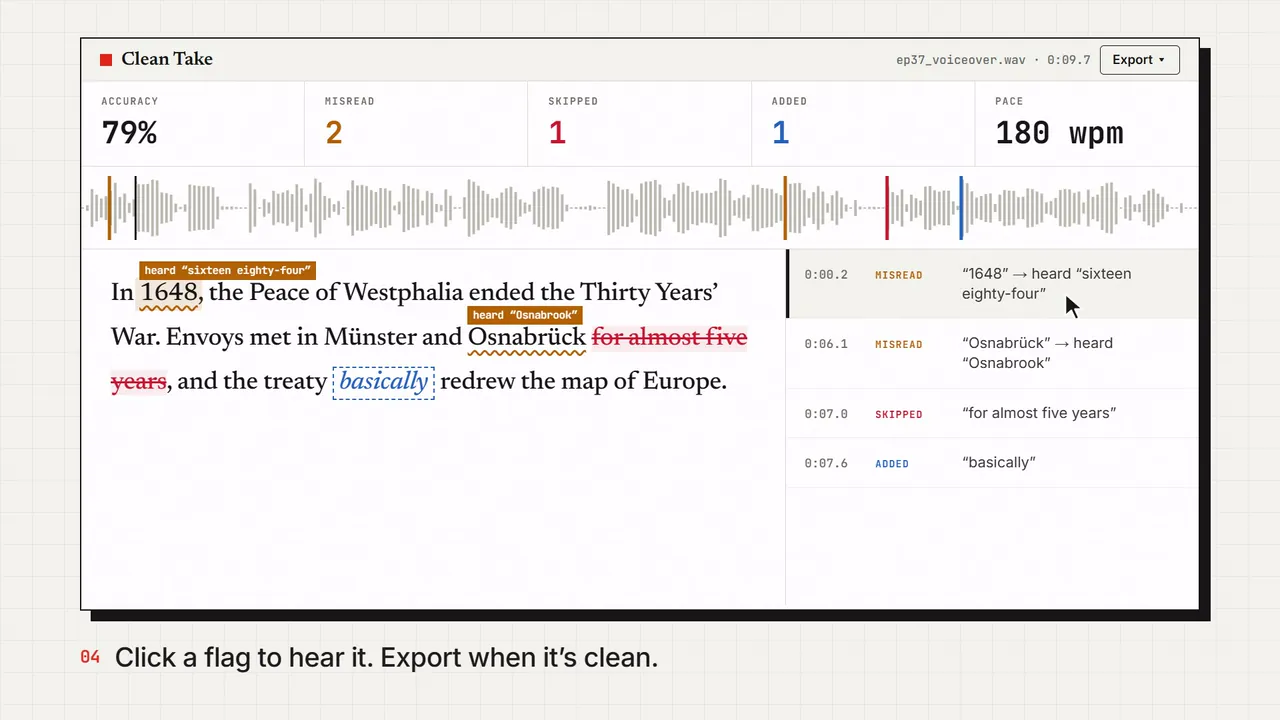
Drop in your voiceover, yours or an AI voice, plus the script. Clean Take listens and marks every word that was skipped, added, or misread. Click one to hear the spot.
- Knows “1500” and “fifteen hundred” are the same thing
- Cuts your flubbed retakes and dead air, and keeps the last clean read
- Exports captions in your script’s spelling, timed to the take
- Runs on your PC. The audio never gets uploaded.
Windows 10 and 11 · Works offline · No subscription